For the complete documentation index, see llms.txt. Markdown versions of all docs pages are available by appending .md to any docs URL.
Architecture
Review the components that make up agentregistry and the role that each one plays.
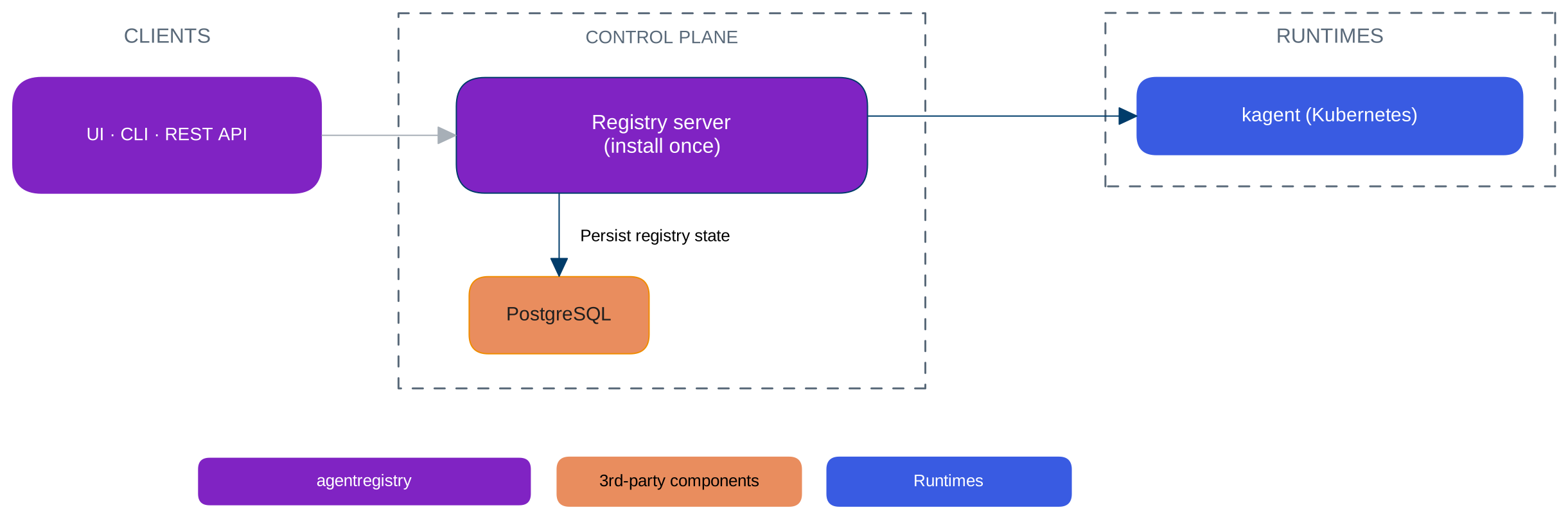
Agentregistry is a single control plane that you install once and connect to one or more runtimes. It provides a common catalog and control-plane experience across those runtimes, while deployment paths vary by runtime.
Component architecture
The following diagram shows the components that make up agentregistry and how they relate to each other.
Registry server
The registry server is the core of the control plane that manages the artifact catalog, deployments, and runtime connections. It serves the registry UI and the REST API that is used by the arctl CLI and other integrations. The server listens on port 12121 by default and exposes the registry as an MCP server on port 31313.
PostgreSQL
PostgreSQL is the control plane’s system of record. It stores published AI artifacts and versions, deployments, runtime connections, and related metadata.
By default, the Helm chart and Docker Compose file deploy a bundled PostgreSQL instance as a single pod or container for development and evaluation. For production, connect the registry to an external PostgreSQL database. For more information, see BYO PostgreSQL database.
Management interfaces
You interact with the registry through three interfaces, all served by the registry server.
| Interface | Description |
|---|---|
| Registry UI | A browser-based dashboard for browsing and searching the catalog, managing artifacts, and deploying agents and MCP servers. |
arctl CLI | A command-line client for developers and automation. Use it to scaffold, build, publish, pull, and deploy artifacts, and to script the artifact lifecycle in CI/CD pipelines. |
| REST API | HTTP endpoints that expose the same capabilities as the UI and CLI. Use the API to integrate the registry into your own tools and portals. |
Runtimes
A runtime is a platform that the control plane connects to in order to deploy agents and MCP servers, or discover existing agents. One registry can connect to multiple runtimes at the same time.
Kubernetes
When you install agentregistry in a Kubernetes cluster, the registry connects to kagent to deploy and manage agents and MCP servers as Kubernetes workloads. The registry server runs as a Deployment in the agentregistry namespace and communicates with the kagent controller to materialize catalog entries as native Kubernetes resources.